


M4 Entity: Faster Project Customization with Low-Code

The M4 Entity System serves as M4's low-code data and UI engine.
Simply put, it transforms frequently used project data, pages, and actions into configurable capabilities. When a client needs to add a new type of business data, tweak a field, or build a new operational page, much of the work no longer needs to start from scratch across the database, APIs, and frontend pages.
This significantly reduces project customization costs and allows clients to continuously adapt the system as their business evolves.
Understanding Entities via the “Material” Page
In M4, users, storage locations, SKUs, containers, shipping orders, and inbound orders are all entities.
An entity primarily defines three things: what fields the business data contains, how this data is displayed, and what actions users can perform.
Together, fields, display layouts, and actions form a complete entity.
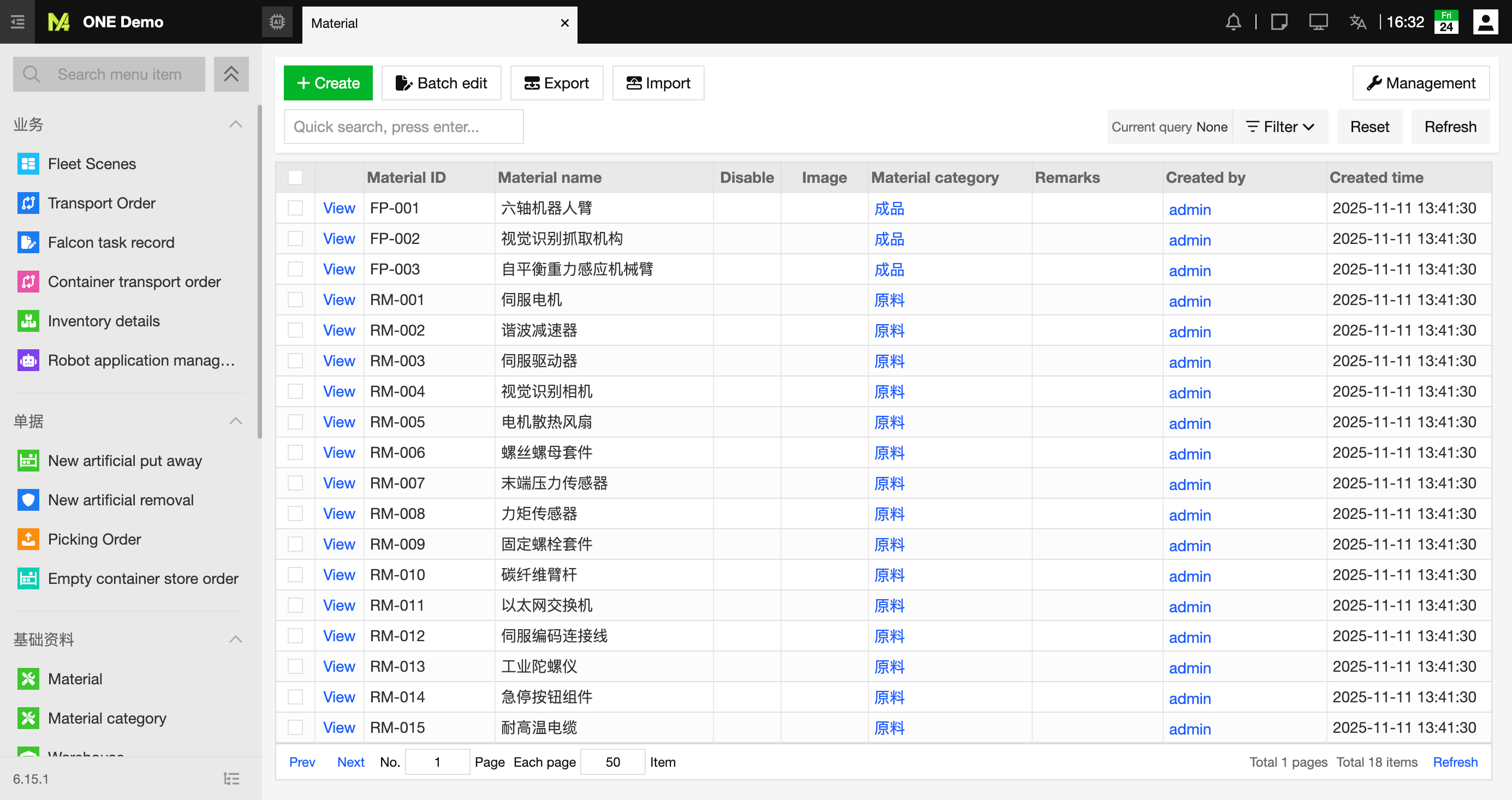
Taking the “Material” entity in M4 as an example, we can configure fields such as material name, specifications, and quality grade; set up what content is displayed on list and detail pages; and add actions like creating or editing records.
“Entity → Material” Defines How the Material Page Works
Navigate to Operations Center → Entity → Material in M4 to view the underlying configuration behind the material page.
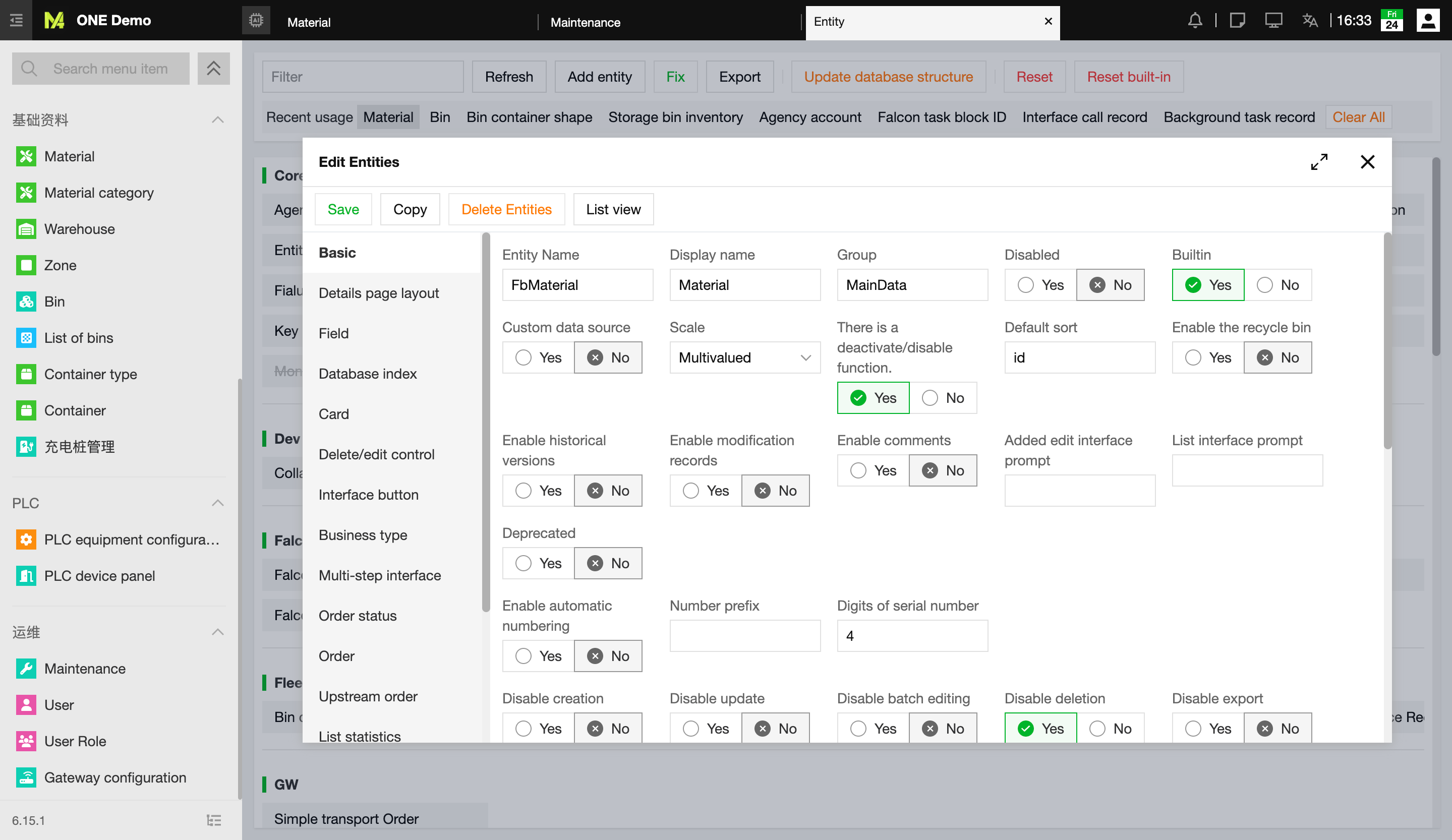
The entity editing page supports the following core capabilities:
- Data Definition: Add, delete, duplicate, and adjust fields. In addition to code and name, fields such as model, specifications, category, unit, price, supplier, weight, dimensions, volume, and owner can be configured for the Material entity.
- Validation & Input Rules: Configure field properties such as required/optional, default values, option lists, entity relationships, fuzzy search, and visibility/editability permissions across view, add, and edit pages (e.g., read-only, editable, or hidden).
- UI Customization: Adjust field ordering, list displays, detail page layouts, card styles, column widths, and alignments to ensure different roles see the most relevant information.
- Action Extensions: Configure UI buttons, business types, business statuses, list aggregations, fixed filters, barcode scanning, quick entry, and custom extension code to seamlessly bridge data pages with client-specific business logic.
As a result, clients see a ready-to-use material management page, while project engineers work with a set of fully adaptable data and UI configurations.
Adding “Quality Grade” Without Re-engineering the Entire Feature
Suppose a client wants to add a “Quality Grade” field to materials. The traditional approach would require modifying the database, APIs, input forms, list views, and import/export logic.
With M4 Entities, you can directly add a “Quality Grade” field to the “Material” entity, then configure its options, required status, page visibility, and import/export permissions. Once saved, this field seamlessly integrates into the existing material management workflow.
If the client also needs automated logic based on the quality grade, it can be handled via extension code, scripts, or Falcon tasks. The entity platform provides generic data and UI capabilities, leaving the project team to focus solely on the business logic that makes a difference.
M4 Turns Repetitive Development into Configurable Capabilities
In traditional projects, adding a new business data type typically means redesigning the database, writing APIs, developing UI components, and building query, permission, and import/export features from scratch. Even for minor requirements, the development and testing workload remains substantial.
M4 Entity comes pre-packaged with these standard capabilities. Clients can use existing entities out of the box, add fields, adjust UI layouts, configure action buttons, or even build entirely new entities. Technical clients and delivery teams can also write custom scripts and configure Falcon tasks to fulfill advanced, tailored requirements.
Low-code does not mean zero engineering. Changes involving complex scripts, data architecture, or critical workflows still require thorough testing and standardized deployment. However, compared to building every feature from scratch, M4 Entity makes customization significantly faster and far easier to maintain long-term.
Helping Standard Products Adapt to Diverse Client Needs
In robotics projects, a rigid set of fixed pages rarely fits every client's workflow. The true value of M4 Entity lies in embedding flexible customization space directly within a standardized product.
Clients can leverage M4's out-of-the-box entities, modify existing ones by adding fields and adjusting pages, or create entirely new entities while connecting them to their unique business processes via scripts and Falcon tasks.
Consequently, M4 offers ready-to-use standard functionalities while empowering clients to meet bespoke requirements at a fraction of the cost. This is precisely why the entity system serves as the core low-code data and UI engine of M4.
